
Here Are The Webinar Tools You Should Be Using In 2017
|

It’s 2017. We know webinar tools aren’t just for online learning. They can be used for internal trainings, conferences, workshops, you name it. More and more people around the world are finding creative ways to collaborate using webinar technology.
We also know you want to hear more about which web conferencing tools are best, given that this is still our top-performing blog post of all time. So we at TechChange wanted to give you a review of the webinar tools we think are the best in the game in 2017, and give you the pros and cons so you can evaluate which ones fit your needs the best.
At TechChange, our primary webinar tool of choice is YouTube Live, which we switched to almost exactly 4 years ago when it was called Google Hangouts on Air. YouTube Live is a free service which provides a consistent level of quality and is ubiquitous enough for most of the guest experts in our courses to be able to access with ease.
However, many of our clients have been switching over to Zoom, a company that began in 2011 but has since grown a major following.
The reason is because there are a number of features Zoom offers that YouTube Live does not. For one thing, because they are a paid service, they offer customer support, which can be very helpful when you don’t have in-house tech support and are trying to host sessions but are experiencing technical difficulties.
They also have a number of additional features they have build out because their customer base is so broad, and they do a good job maintaining them. Google, because it offers YouTube Live for free, can sometimes stop maintaining certain features, such as the Cameraman app, which allows webinar hosts to have more control over which video feeds the audience can see, with no notice to clients.
For example, Zoom allows presenters to draw on the screen, enable cloud recording, and offers numerous integrations with services like Slack, HipChat, Zapier, Kaltura, and more. Because everything is built upon APIs, you can also access every aspect of the Zoom experience from outside of Zoom, such as how many people joined, etc.
Zoom also allows participants to call in by phone, which can be very useful when hosting sessions with participants from low-bandwidth countries with unreliable infrastructure. There is an option to allow the person calling in to the session pay for the call or to allow the host to pay for the call. They can also host more participants in a single webinar than YouTube Live can, with a maximum of 200 participants when using their highest level Enterprise plan.
But there are also a couple of downsides to Zoom: the first is that it requires all participants to download the Zoom application. This can sometimes be tricky to coordinate, especially on a tight deadline. Additionally, you can only embed Zoom events on a website if you are using the YouTube or Facebook Live integration, which cost an extra $50 a month on top of the usual subscription fee. YouTube Live will also auto-record and auto-archive your events, whereas in Zoom, you need to enable recording, which can be a pro or a con, depending on your use case.
Once a live session concludes, the value of a webinar doesn’t end—it simply shifts into a different phase of the content lifecycle. Recordings become a lasting asset, allowing teams to revisit discussions, share insights with those who couldn’t attend, and build a growing archive of knowledge. This transition from live delivery to stored content creates opportunities to extend the reach and impact of each session, turning a one-time event into a resource that can continue to provide value over time.
Organizing and maintaining these recordings thoughtfully ensures they remain accessible, relevant, and easy to integrate into future communications. As these archived sessions accumulate, the focus naturally moves toward how they can be reused and adapted for different purposes.
Segments can be repackaged into shorter clips, key moments can be highlighted for training or promotional use, and full recordings can be redistributed in formats that suit varying audience needs. Incorporating YouTube video downloader, supports this process by making it easier to manage and transform recorded material into flexible assets. By treating webinar recordings as part of an ongoing content strategy, organizations can maximize their investment, continuously reshaping existing material to engage audiences in new and meaningful ways.
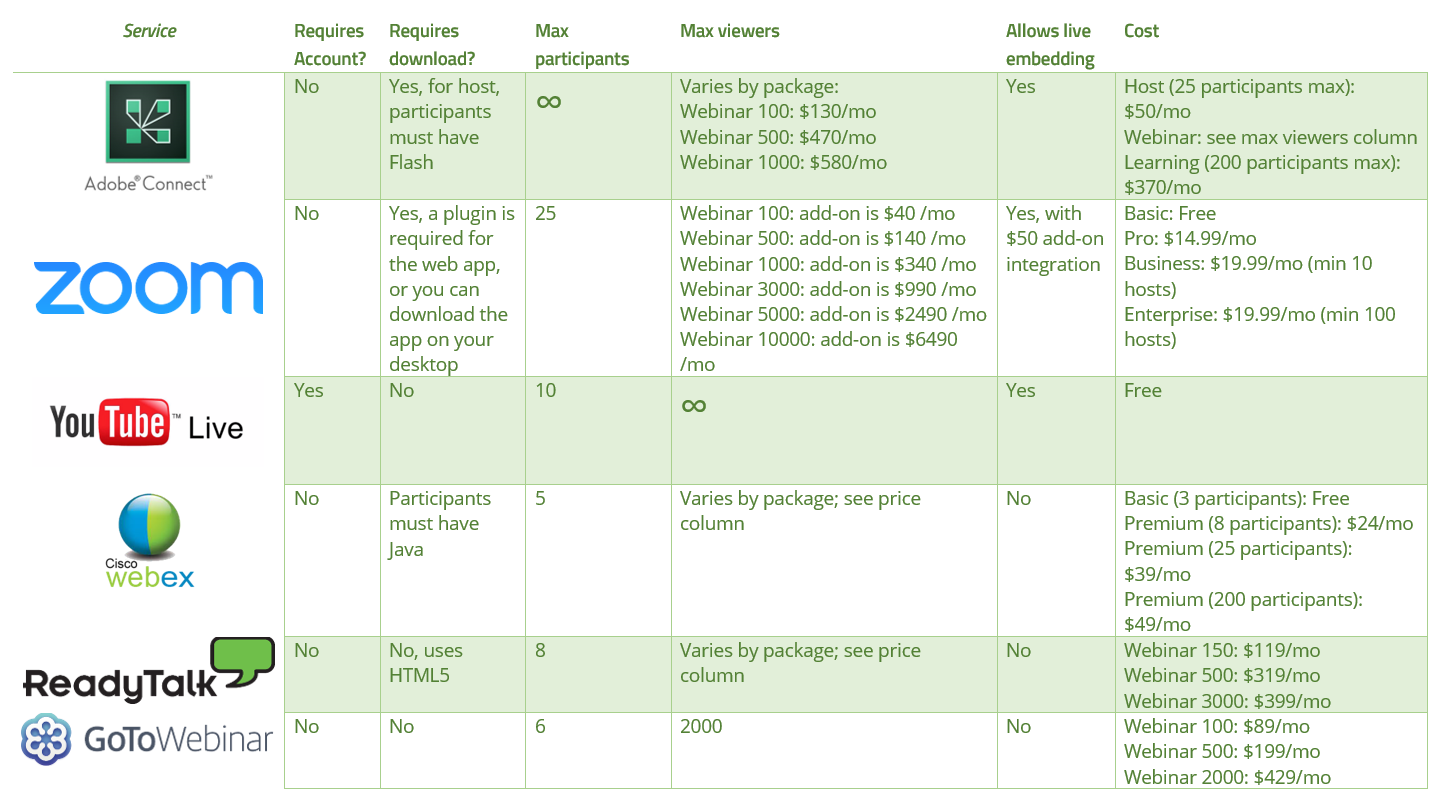
At the end of the day, TechChange courses will be sticking with YouTube Live, but we offer support to clients who want to pay to take advantage of Zoom’s advanced features. If you want a quick overview of Zoom and YouTube Live’s features compared to other webinar tools, please see the chart below!

Today, we're excited to share an interview with TechChange alum Ladislas Hibusu! Ladislas has completed 5 courses and is currently...

Mihret Tamrat recently joined the team this month as an Instructional Design Fellow. Mihret brings a wealth of experience -...

Earlier this week, Georgetown University announced the launch of its brand new Beeck Center for Social Impact & Innovation. This...